Electricity Bill QR Code Pakistan 2026 — Full Guide
If you have received your latest electricity bill and noticed a small square barcode printed on it — that is a QR code. Millions of Pakistani households are seeing this for the first time in 2026 and wondering what it means, whether they need to scan it, and whether it has anything to do with their subsidy.
This guide answers every question you might have — in plain language, with step-by-step instructions and an important section on security risks you must know before scanning anything.
What Is the QR Code on Your Electricity Bill?
QR stands for Quick Response. It is a type of barcode that your smartphone camera can read in seconds. When scanned, it opens a website, shows information, or starts a process — all without typing anything manually.
The QR code printed on Pakistani electricity bills in 2026 serves two different purposes depending on where it appears on your bill:
QR Code 1 — General Bill Verification
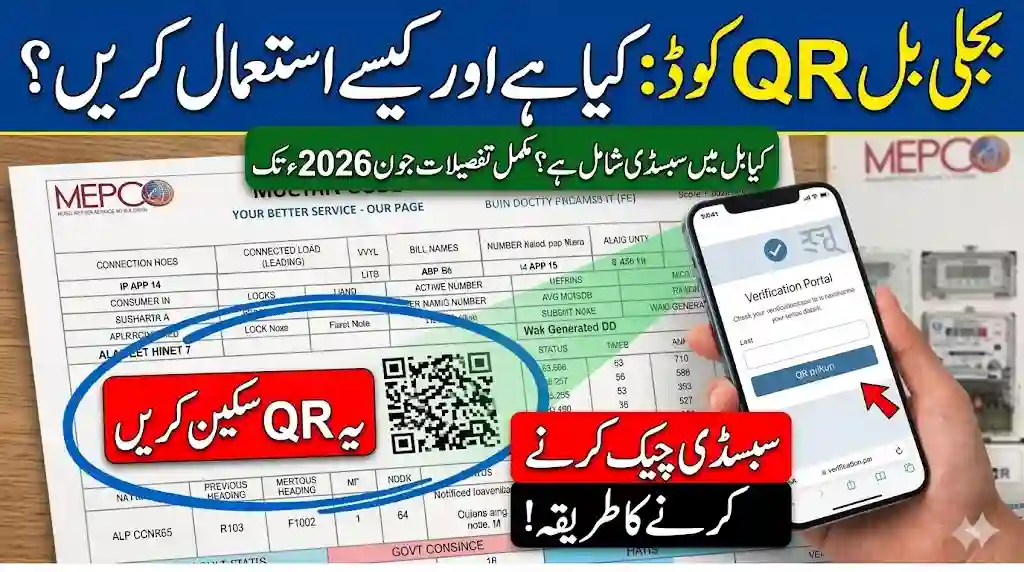
This code contains your basic consumer details — reference number, meter number, billing month, and the amount due. Scanning it takes you to your distribution company’s verification portal where you can confirm the bill is genuine and view payment details.
QR Code 2 — Subsidy Verification (for eligible consumers)
This is the more important one for low-income households. Consumers using up to 200 units of electricity per month will find QR codes printed on their bills enabling access to subsidised benefits through a fully digital process. Scanning this code opens the PITC (Pakistan Information Technology Corporation) subsidy portal where you complete identity verification to confirm or continue your subsidy eligibility.
Not every bill has both codes. If your household uses more than 200 units per month, you will likely only see the general verification QR code.
What Information Does the QR Code Contain?
When you scan the general bill QR code, the encoded information typically includes:
- Your 14-digit reference number
- Consumer name as registered with the distribution company
- Billing month and year
- Total units consumed
- Amount payable before and after due date
- Distribution company name (LESCO, PESCO, HESCO, IESCO, MEPCO, K-Electric, etc.)
- Payment due date
This information is the same as what is printed on the bill itself. The QR code simply makes it faster to access digitally — especially for online payment apps and verification portals.
For the subsidy QR code, the encoded data points directly to the PITC verification portal with your consumer reference pre-loaded, so the system knows which account to verify.
Does the QR Code Show Your Subsidy Amount?
Yes — and this is a major development in 2026. The Power Division announced a new mechanism under which electricity consumers receiving government subsidies will now see the exact subsidy amount mentioned on their monthly power bills.
Previously, consumers had no easy way to see how much subsidy was being applied to their bill. The new QR-based system changes that — after scanning and completing verification, you can see exactly how much relief you are receiving each month under the government’s Cross-Subsidy Program 2026.
The government launched this new digital system that uses QR codes printed directly on electricity bills to distribute consumer subsidies, with households consuming up to 200 units of electricity per month eligible to access subsidised benefits through this fully digital registration process.
Who Is Eligible for the Subsidy QR Code?
The subsidy QR code and the Cross-Subsidy Program 2026 applies to:
- Residential consumers using 200 units or less per month
- Low-income and protected consumer households
- Families without any household member registered as an active FBR tax filer
- Households with a single electricity meter (multiple meters in one household may be disqualified)
Commercial consumers, industrial users, and households consistently using above 200 units do not fall under the protected consumer category and will not see a subsidy QR code on their bills.
Step-by-Step: How to Scan the QR Code on Your Electricity Bill
Scanning is simple and takes less than two minutes. Here is the complete process:
Step 1 — Find the QR Code on Your Bill
Consumers using less than 200 units will notice two QR codes on their electricity bill. Look for the one mentioning subsidy verification — the code will redirect users to the official verification page. It is usually printed near the bottom section of the bill.
Step 2 — Open Your Phone Camera
On most modern Android and iPhone devices, the built-in camera app can scan QR codes directly. Simply open your camera, point it at the QR code, and hold it steady for 2–3 seconds until a link appears at the top of your screen.
If your camera does not detect it automatically, download any free QR scanner app from the Play Store or App Store.
Step 3 — Tap the Link That Appears
After your camera reads the code, a link or notification will appear. Tap it to open the verification portal. Make sure you are connected to the internet before doing this.
Step 4 — Enter Your Details
The process requires users to enter a 14-digit reference number along with their CNIC details for identity verification purposes. Have your electricity bill and your original CNIC ready before starting.
Step 5 — Complete OTP Verification
Consumers must scan the QR code printed on their electricity bill, open the PITC subsidy portal, enter their CNIC, Consumer ID, and Reference Number, then complete OTP verification through their mobile number. The OTP will be sent to the mobile number registered under your CNIC.
Step 6 — Submit and Confirm
Once completed successfully, VERIFIED will appear on the screen. Your subsidy eligibility is now confirmed for the current cycle. Keep a screenshot of this confirmation for your records.
What Happens If You Do Not Scan the Subsidy QR Code?
This is important. Failure to complete verification may end subsidy benefits and increase per-unit charges significantly.
The government has made QR verification mandatory for protected consumers in 2026. If you are eligible for subsidy but do not complete the verification process, the system may assume your details are unverifiable and remove your protected consumer status. This means your per-unit electricity rate could jump significantly in future bills — sometimes doubling or more.
The government started QR verification to stop misuse of subsidy funds and ensure that only deserving families continue receiving support. Officials found that some ineligible users were also benefiting from subsidized electricity rates, and because of this, a digital verification process has now been launched.
If you use 200 units or less per month and see a subsidy-related QR code on your bill — scan it and complete verification as soon as possible.
Which Distribution Companies Have Introduced QR Codes?
The QR code system is being rolled out across all major electricity distribution companies in Pakistan:
| Company | Coverage Area |
|---|---|
| LESCO | Lahore and surrounding districts |
| PESCO | Khyber Pakhtunkhwa |
| HESCO | Hyderabad and interior Sindh |
| IESCO | Islamabad, Rawalpindi, Attock |
| MEPCO | Multan and South Punjab |
| GEPCO | Gujranwala division |
| FESCO | Faisalabad division |
| K-Electric | Karachi |
| QESCO | Quetta and Balochistan |
The new power bill verification system is being linked with companies like LESCO, PESCO, and K-Electric. Other distribution companies are in various stages of implementation. If you have not yet seen a QR code on your bill, it may arrive in the next 1–2 billing cycles depending on your company.
Security Risks — Read This Before Scanning
This is the section most guides skip, and it is one of the most important parts of this article. QR codes are convenient, but they also carry real security risks that every consumer must understand.
Risk 1 — Fake QR Code Scams
Fraudsters print fake QR codes on paper and paste them over the original QR code on electricity bills — or distribute fake bills entirely with malicious codes. When you scan a fake QR code, instead of going to the official PITC portal, you are taken to a fraudulent website that looks identical to the real one.
On that fake site, you are asked to enter your CNIC, reference number, mobile number, and sometimes bank account details. Once entered, scammers use this information for identity theft, SIM swap fraud, or unauthorized bank transactions.
How to protect yourself:
- Always check the website URL after scanning before entering any information. The official PITC portal uses pitc.com.pk or an official government domain ending in .gov.pk
- If the URL contains random words, numbers, or unfamiliar domain names — close it immediately
- Never enter bank account details, ATM PIN, or any payment information on a page reached through a QR code on your electricity bill. The legitimate subsidy verification process never asks for banking information
- If your physical bill looks tampered with — smudged edges, a sticker over the printed area, or a QR code that looks different from your previous bills — do not scan it. Contact your distribution company’s helpline first
Risk 2 — Phishing Links in QR Codes
Some fraudulent QR codes do not lead to fake subsidy pages but instead download a file or redirect to a page that installs malware on your phone. This can happen silently without any obvious sign.
Protection steps:
- Keep your phone’s operating system and security apps updated
- If your phone asks to download a file or install an app after scanning a QR code on your electricity bill — decline immediately. Legitimate government portals never ask you to download anything
- Use Google Play Protect on Android or keep your iPhone’s iOS updated to ensure malicious apps are blocked
Risk 3 — Middleman Fraud
Some agents and individuals in markets or near government offices offer to scan and complete the QR verification for you — for a fee. This is unnecessary and dangerous. The process is free, takes under two minutes, and requires no technical knowledge.
Giving your CNIC details, reference number, or mobile phone to a stranger for this purpose exposes your personal information to misuse.
Rule: The entire QR verification process is free. Anyone asking for money to help you scan your electricity bill QR code should be avoided.
Risk 4 — OTP Sharing Scams
After entering your details on the legitimate PITC portal, you receive an OTP on your registered mobile number. Fraudsters sometimes call pretending to be government employees and ask you to share this OTP to “complete verification.”
Critical rule: Never share your OTP with anyone over the phone, WhatsApp, or any other channel. The legitimate verification system completes automatically after you enter the OTP on the portal yourself. No government official will ever call to ask for it.
How to Verify You Are on the Official Portal
Before entering any personal information after scanning a QR code, check these things:
- The URL starts with emdrpk.com the padlock icon should be visible in your browser
- The domain ends in .gov.pk or is pitc.com.pk
- The page loads quickly and professionally without pop-up ads or unusual requests
- The page does not ask for banking details, ATM PIN, or wallet passwords
If anything looks wrong — close the browser, go to the official website manually by typing the address, and complete verification from there instead.
Summary — Everything You Need to Know
| Question | Answer |
|---|---|
| What is the QR code on my bill? | Bill verification or subsidy registration code |
| Who has a subsidy QR code? | Households using 200 units or less per month |
| Does it show subsidy amount? | Yes, after completing verification |
| Is scanning mandatory? | Yes, for protected/subsidy consumers in 2026 |
| What if I don’t scan? | Subsidy may stop, higher per-unit rates may apply |
| Is the process free? | Yes, completely free |
| Which companies have it? | LESCO, PESCO, HESCO, IESCO, MEPCO, K-Electric and others |
| Biggest security risk? | Fake QR codes leading to phishing sites |
| Safe portal domain? | pitc.com.pk or domains ending in .gov.pk |
| Should I share my OTP? | Never — with anyone |
Frequently Asked Questions
Q: I scanned the QR code but the page is not opening — what do I do?
Check your internet connection first. If the connection is fine, try using a different QR scanner app or open your camera in a brighter environment with the bill held flat and steady. If the code itself appears damaged or unclear, contact your distribution company’s helpline and request a duplicate bill.
Q: My bill does not have any QR code — why?
QR codes are being rolled out gradually across distribution companies. If your company has not yet introduced them, your bill may not have one yet. This does not affect your subsidy status — continue paying your bill normally and watch for the code on future bills.
Q: I completed the QR verification last month — do I need to do it again?
In most cases, verification is a one-time process per billing cycle. However, the system may prompt re-verification in future months. Always check your latest bill for any new QR codes or instructions.
Q: Can I complete subsidy verification without scanning the QR code?
Yes. You can also visit the PITC portal directly by typing the official address in your browser and entering your reference number and CNIC manually to complete verification without scanning.
Q: What should I do if I think I scanned a fake QR code and entered my details?
Contact your bank immediately if you entered any financial information. File a complaint with FIA Cybercrime by calling 9911 or visiting complaint.fia.gov.pk. Also contact your distribution company’s helpline to flag any potential misuse of your consumer account details.